Skip to contentGet DudeGlass

BUILT FOR WINDOWS

Your Desktop.
A Little Clearer.

You bought your programs. Make your own damn rules.

Created by a Music Teacher. Made for everyone, pardon my Fr*nch.

Keep the controls. Lose the clutter. Bring your desktop out of hiding with supported glass treatments, cropped views and shortcuts that know when to get out of the way.

Show me the good stuff ↓

DudeGlass + Companion. One build. Hella fast. Zero subscription nonsense.

US$3.99 · lifetime betaCompanion includedBuilt for Windows
Glass support: Discord + Audient iD Mixer · version-specific ↗
● ● ●YOUR SPACE, REIMAGINED↗
09:41A little room to focus.
Click Workspace to reveal or hide the shortcuts.
⊞⌕▣◉▴ ⌁ 09:41
Click once to open. Click again to close.

Holy Sh*t, It Works.

Less Window.
More “Oh, Hell Ya!”

Click the desktop through the program’s cleared background—while keeping its controls right in front of you. Watch the real Audient footage, followed by the workspaces we want to build next.

Music and painting by Brendan Twamley
Edited from Brendan’s recordings, with his mountain-and-lake painting retained.
TAKE IT FOR A SPINTry the controls ↗Find your workflow ↗Meet the toolkit ↗

REAL MEASUREMENTS. REAL HARDWARE.

Holy F*ck That’s Fast

A whole lot happening under the glass. Here’s what we measured on Mustang Sally, with the scope of every number right beside it.

Hella Fast. Here’s The On/Off Run.

We switched the deployed DudeGlass stack off, measured, restored it and measured again. Each phase used 60 one-second samples after settling, with the same apps left open and video renders paused. This is a desktop-session observation, not a gaming, input-latency or active glass-adapter benchmark.

0.92%DudeGlass stack · average whole-PC CPU share
233.5 MiBStack working sets · includes shared pages
+146.5 MiBObserved whole-PC RAM difference · ON minus OFF

Same PC. Stack Off, Then On.

Observed Whole-PC MetricOFFON
CPU capacity in use8.31%6.67%
Physical RAM in use12.58 GiB12.72 GiB
Device VRAM in use1905.0 MiB1891.3 MiB
Physical-drive reads0.006 MiB/s0.008 MiB/s
Physical-drive writes8.621 MiB/s8.584 MiB/s

Whole-PC CPU was lower during the ON phase; that does not establish a speed improvement.

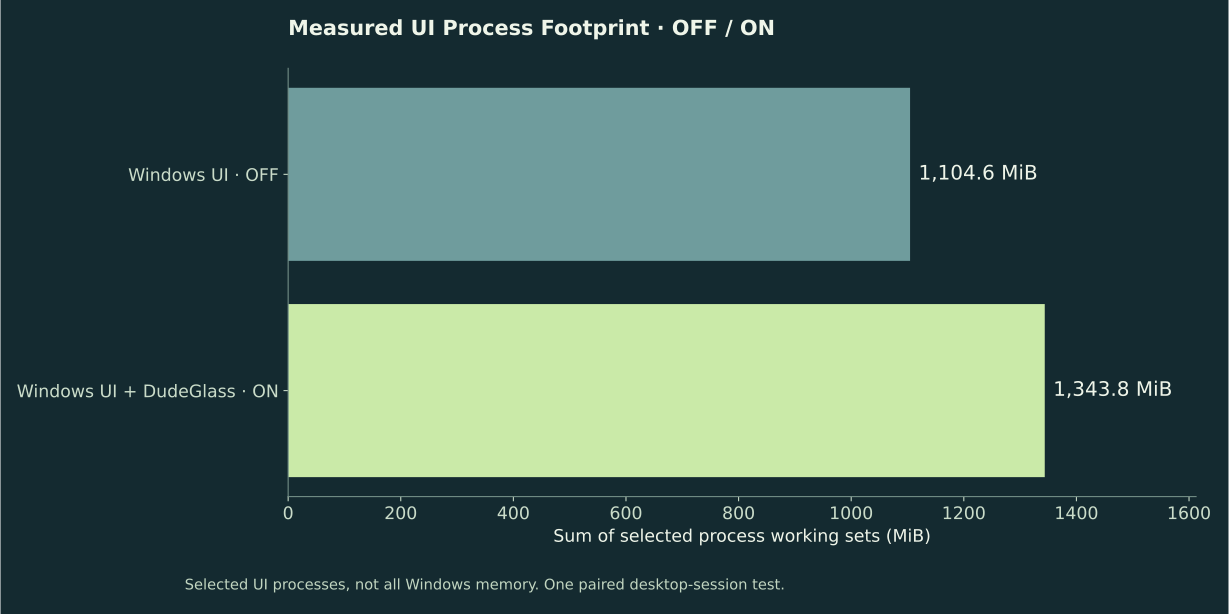
Selected Windows UI process RAM: 1104.6 MiB with DudeGlass off, and Windows UI plus DudeGlass at 1343.8 MiB with it on.

What About Other Open Programs?

These process-group averages come from a separate 60-second ON-phase capture. They include each named app’s matching processes. Shared pages can appear in more than one working set, so these are comparable process totals, not unique physical RAM.

Adobe Creative Cloud services915.4 MiB
ChatGPT desktop processes2394.3 MiB
DudeGlass stack235.0 MiB
Spotify1045.6 MiB
Windows UI987.2 MiB

Windows UI means the named UI process group, not the whole operating system.

Download This Run’s Measurements ↗

EARLIER LIVE-SESSION CAPTURE · OCTOBER 23, 2026

Small Footprint. Hella Fast.

Sixty seconds, sixty samples. Here’s the measured resource use of the DudeGlass host, Companion and desktop reveal service together on the creator’s i5-12600K, RTX 3070 and 32 GB RAM setup.

Three Core ServicesAveragePeak
CPU · Whole-Machine Capacity0.65%1.95%
RAM · Combined Working Set135.4 MiB137.0 MiB
Process Read I/O0.237 MiB/sNot sampled
Process Write I/O0.013 MiB/sNot sampled

The active Audient adapter’s sampled GPU dispatch averaged 0.034 ms, with a 95th percentile of 0.035 ms. The entire Audient application averaged 162.8 MiB RAM, including the mixer itself.

This is a live-session observation, not a controlled off/on comparison or a repeatable interaction workload.

Small Interface. Serious Work Behind It.

The reveal button is the bit you see. Underneath is an original, coordinated system handling application changes, hardware readings, live controls and the work that brings your desktop together. Built, rebuilt and tested by one very persistent dude.

1.2 Million+

Routed rendering operations recorded in one Audient session.

150,000+

Presentation operations recorded in that same session.

50,000+

Update checks recorded while the system kept working behind the scenes.

Cumulative counters from one creator session on October 23, 2026.

Hardware and application monitoring add a changing picture of CPU, GPU, RAM, disk and network activity, plus available temperature, clock, power and fan readings. Repeated sampling builds thousands of readings over a session; coverage depends on the hardware, drivers and monitoring options.

0.036 msAverage sampled GPU dispatch time · Audient adapter
0.037 ms95th-percentile sampled GPU dispatch time
19.2 MiBAdapter-reported GPU surface allocation
26.4 MiBDedicated GPU memory · entire Audient process
5.9 MiBShared GPU memory · entire Audient process
229.8 MiBAverage RAM working set · entire Audient process
0.88%Combined CPU · three core services · 120-second average
132.9 MiBCombined RAM working set · three core services · 120-second average
120 secondsLive workload capture · 60 timing samples

Measured October 23, 2026 on the creator’s i5-12600K / RTX 3070 / 32 GB PC, with 16 logical processors.

Windows GPU memory counters were sampled separately over three seconds.

Opening Apps. Keeping Things Moving.

The creator opened programs during this two-minute capture. Windows reached 244 observed processes across the entire PC. Here’s the whole-machine load, including all applications and the measurement tools.

Whole-PC MetricAveragePeak
CPU Utilization13.3%50.9%
GPU Utilization4.4%41%
RAM In Use13.58 GiB14.86 GiB
VRAM In Use1.82 GiB1.99 GiB
Disk Reads · Both Drives1.24 MiB/s12.4 MiB/s
Disk Writes · Both Drives6.49 MiB/s121.9 MiB/s

Whole-PC figures are not DudeGlass overhead.

Full-frame render time, frame pacing and isolated adapter overhead still need a controlled benchmark.

LESS IN THE WAY

A Tidy Desktop.
Without The Treasure Hunt.

Your icons are right there when you need them. The rest of the time? Enjoy the view.

All Those Folders. One Hover Button.

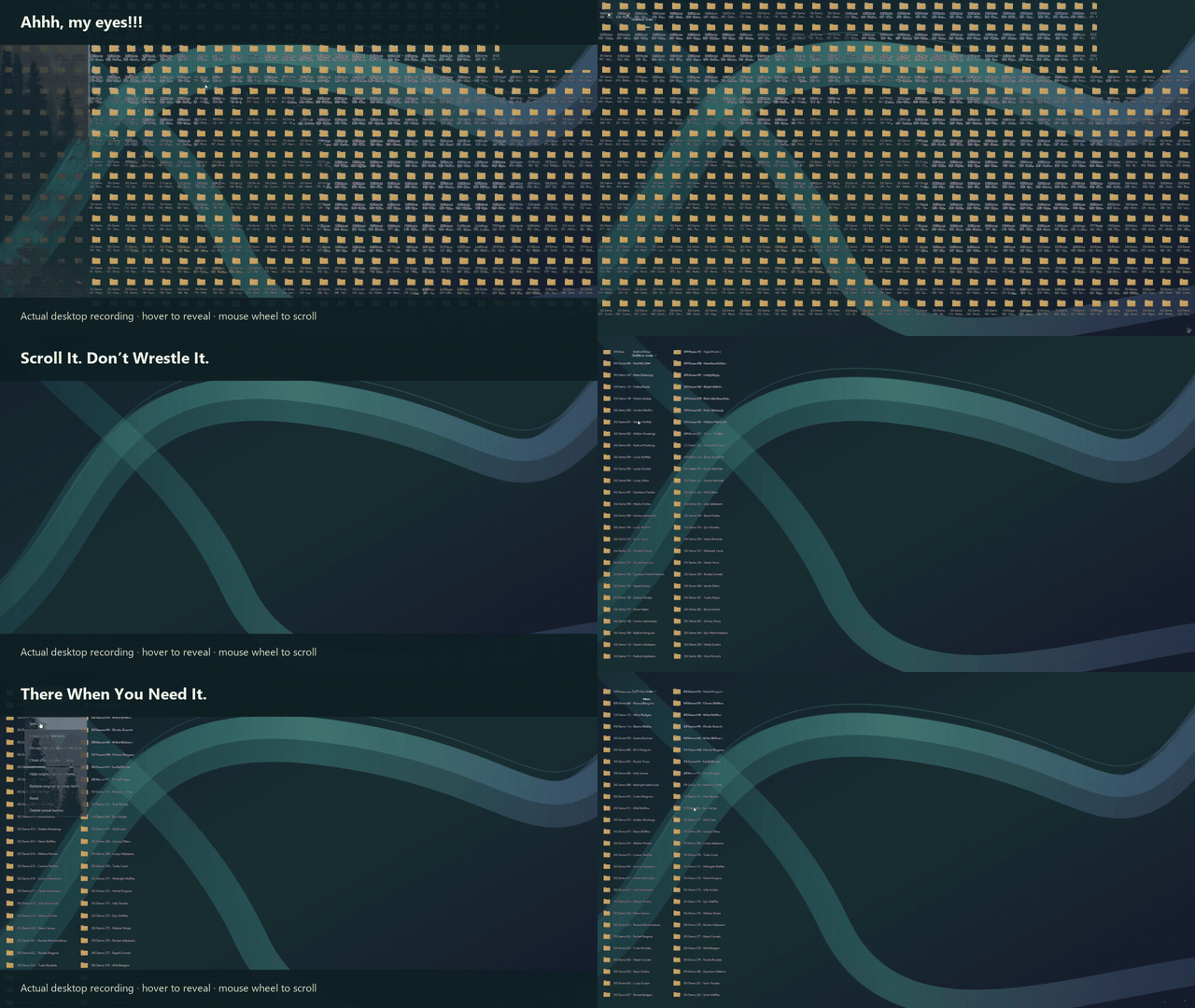
An actual desktop recording: collapse the folders into one reveal button, hover to show them, then scroll with the mouse wheel.

Actual screen recording, edited for length and with the wallpaper replaced by the DudeGlass background.
01 / REVEAL

One Stack. Your Whole Setup.

Put multiple program shortcuts into a named stack—Gaming, Work or Creative—and reveal them together in rows that fit your desktop. One button. Less digging.

Interactive example

One button. Ready when you are.

02 / SCROLL

Your Mouse Can Relax.

Scroll across the invisible program zone, including the spaces between icons.

Interactive example
Discord
iD Mixer
Game Library
Music
Projects
References
Editor
Footage
Audio
Exports
Sketches
Textures

Scroll here—even in the gaps between icons.

03 / STEP AWAY

Two Seconds. Clutter Gone.

The countdown starts when you leave the program zone. Come back to keep it open.

Interactive example

Clutter gone. Your wallpaper stays.

ONE BUTTON. YOUR KIND OF BUSY.

Build A Stack Around What You Do.

Group multiple program shortcuts under a name that makes sense to you. Compatible live crops can group controls too; support depends on the app and version.

PLAY / GAMING

Gaming Stack

Game shortcuts, Discord and your Audient mixer. Keep the squad, the sound and the next session together. Less desktop archaeology. More game time.

DRAW / ILLUSTRATION

Illustration Stack

Your drawing app, reference images, palette and project folder. Keep compatible cropped brush controls nearby. Everything for the next masterpiece—or the next wonderfully weird doodle.

MAKE / VIDEO PRODUCTION

Video Production Stack

Your editor, audio tools, footage folders and storyboard references. Group compatible cropped playback controls alongside them. Less hunting through windows. More getting the cut right.

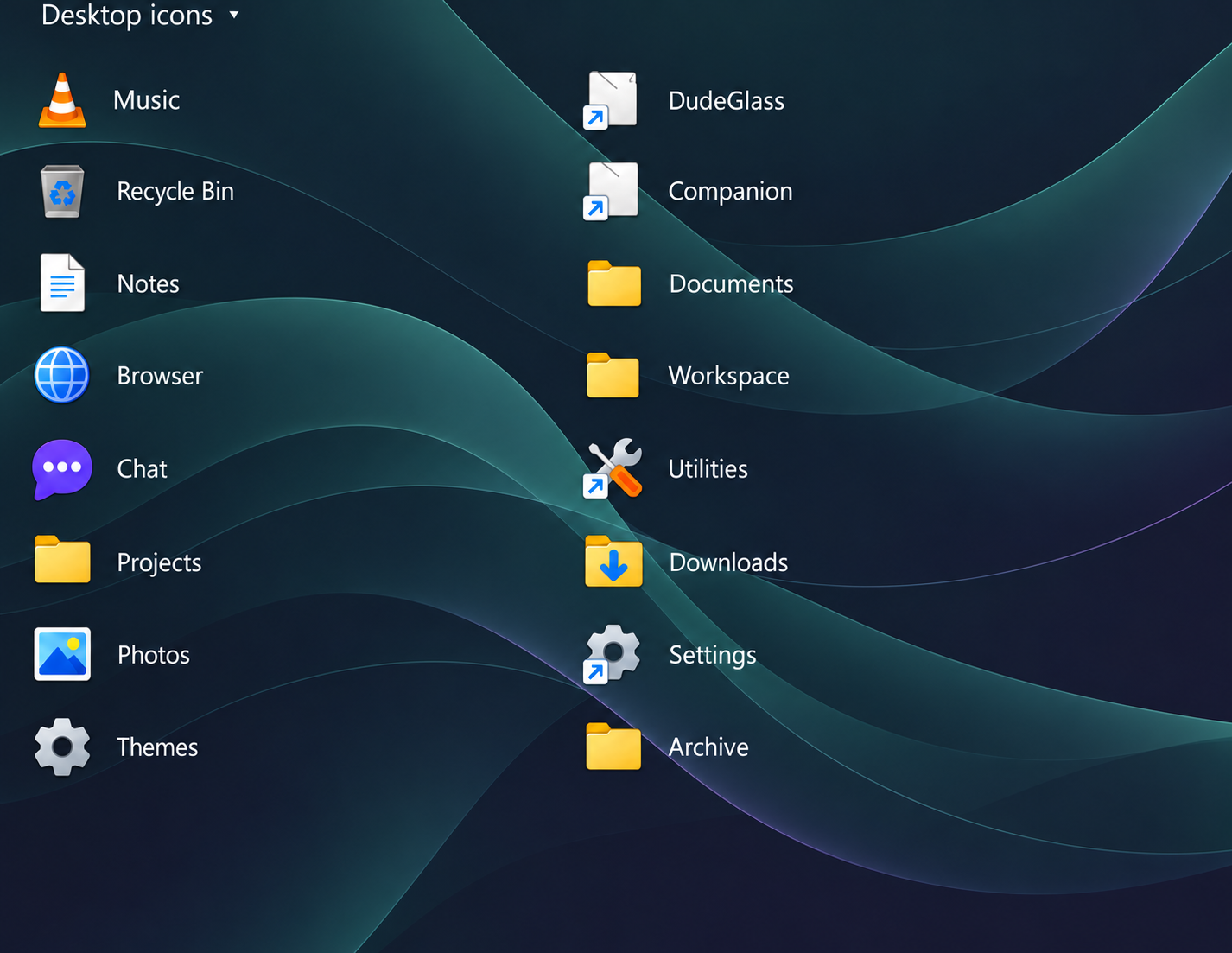
Illustrative edit showing a text-only Desktop icons reveal button above two columns of generic shortcuts on an original abstract blue and teal wallpaper.
Illustrative edit of the supplied desktop capture.

YOUR ICONS. WITHOUT THE BOX.

All Together.
Out Of The Way.

A plain text reveal button opens a full group of desktop shortcuts. The invisible zone stays active for hovering and scrolling, even between icons.

  • Named stacks for multiple program shortcuts
  • Text-only button and borderless group
  • Icons arranged in rows and columns
  • A–Z and natural alphanumeric sorting
  • Two-second auto-hide after leaving the zone

Interactive illustration above.

WHO IT’S FOR / FUTURE WORKFLOW IDEAS

Different Work.
The Same Wish For More Room.

Layer references behind your working window. Adjust opacity to keep both in view. These examples explore the direction we’re building towards.

Find your workflow

WORKSPACE IDEAS / 01

Gamers

Build a calmer setup around the game you’re playing.

01

Create a Gaming stack with multiple program shortcuts behind one named reveal button.

02

Explore a walkthrough, map or build guide behind a compatible windowed game, visible through adjusted opacity.

03

Group compatible cropped voice, mixer and music controls into a live-control stack. App and input compatibility vary.

04

Plan a cropped video guide that keeps playing in its own corner.

Future workflow concepts · application support varies

Workflow ideas: these examples do not establish application compatibility. Drawing overlays are visual references and do not verify dimensions, alignment or technical correctness. Glass support currently covers compatible versions of Discord and Audient iD Mixer. AutoCAD, Adobe Fresco and Google/browser examples below are illustrative future scenarios.

BLUEPRINTS + CAD / CONCEPTORIGINAL DEMO PLANAutoCAD conceptPlan A + revision overlay

Two Plans.
One Place To Compare.

The CAD-style revision sits directly over the original plan at the same scale and position. Adjust opacity to compare the highlighted layout changes without losing alignment.

Both layers share the same origin, scale and orientation in this illustration.
SCHEMATIC + SEARCH / CONCEPTSCHEMATIC • FICTIONAL DEMOR1C1
DRAWING REFERENCESCH-DEMO-042

The Reference.
Right Over The Schematic.

The drawing reference sits underneath the browser. Lower its background opacity to read the number being typed, then raise it to see the difference. No search is sent.

1 / Start with the schematic and its reference number.

REFERENCE + DRAWING / CONCEPT
SKETCH LAYER / REFERENCE UNDERNEATH
Adobe Fresco · concept✎ ◌ ▱
Fox reference below the sketch

Your Reference.
Under Your Brush.

A fox character reference sits beneath a matching line sketch in this Fresco-style concept. Lower the Fresco-style window’s background opacity to see the reference underneath your sketch. Raise it to focus on the drawing.

SMALL CONTROLS. BIG DIFFERENCE.

Keep The Good Bits.
Make Room For Everything Else.

Your mixer beside your chat. Your desktop out of hiding. Have a play with these interactive examples.

MIXER / ORIGINAL WINDOW
Monitor level64%

Original stays in place

↗A little control.
Its own little space.

01 / COPY CROP

The Part You Want.
Right Where You Want It.

Crop a useful region into its own view and keep the original window. Put the controls you reach for beside the work you’re doing.

Interactive illustration. Live capture and input support vary by application.
Actual recording: folders collapse into one hover reveal button, then open into a two-column group with mouse-wheel scrolling.
Watch a desktop full of folders collapse into one hover button.
YOUR DESKTOP STILL EXISTS.
MUSIC / GLASS PREVIEW − □
♫
A little breathing room
↶ ◀ Ⅱ ▶ ↷

02 / TRANSPARENCY

Less Window.
More “Oh, Hell Ya!”

Dial in how much desktop comes through. Find a balance that keeps the window useful and the space behind it visible.

Background-only illustration. Whole-window opacity also fades foreground content; selective treatments require compatible apps.

THE BREAKTHROUGH / DISCORD + AUDIENT

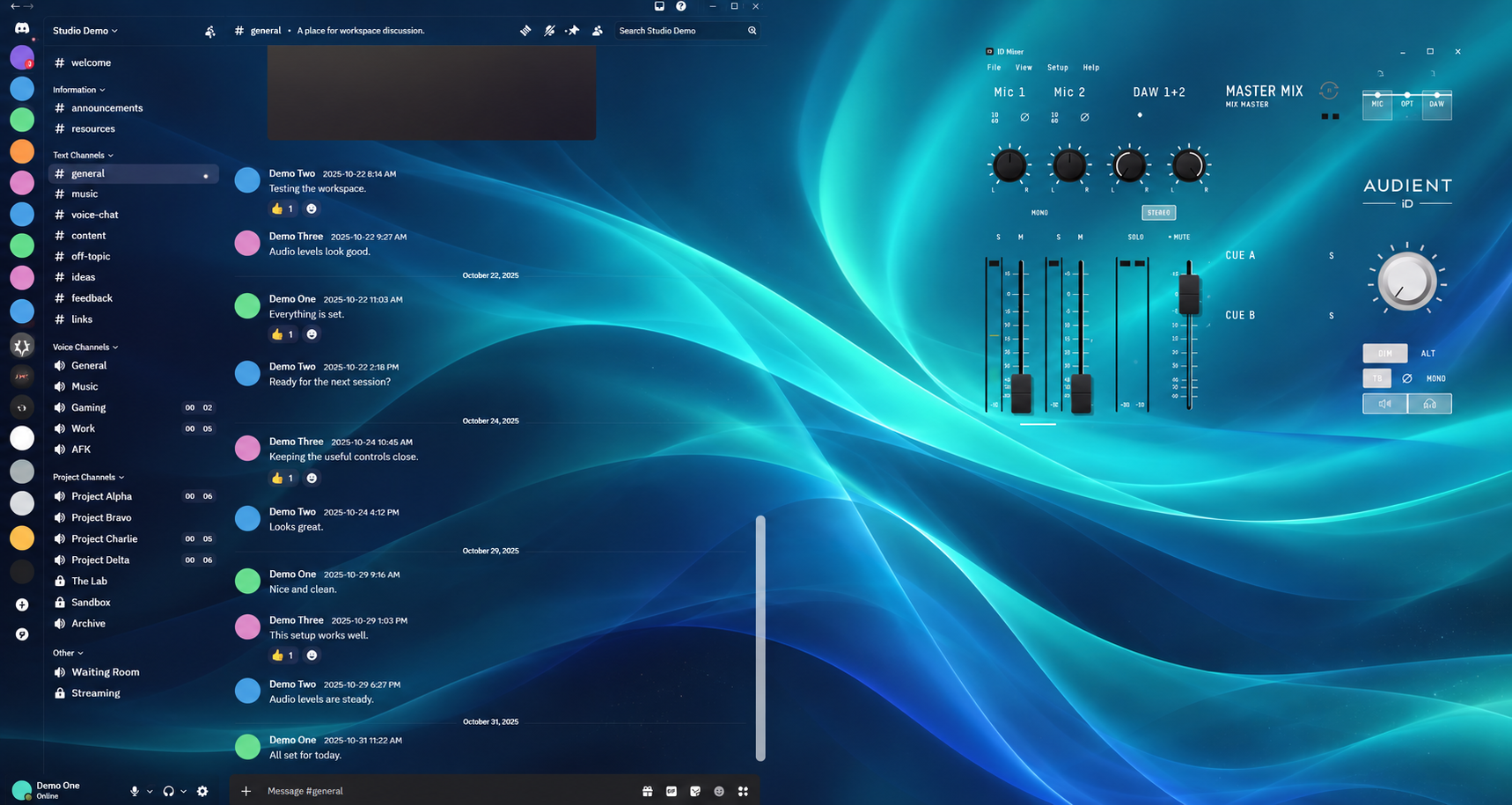
We Did The Impossible.

Two programs so far. Separated by one dude.

DudeGlass brings glass support to Discord and Audient iD Mixer through application-specific adapters. Built from the basement, around a full-time teaching job, through a mountain of testing and problems that refused to stay fixed. This is the breakthrough the project was built for.

Current glass support: compatible Discord and Audient app + adapter versions.

Privacy edit of the creator’s actual screenshot, preserving the transparent Discord chat and Audient mixer layout with fictional chat content and the DudeGlass wallpaper.
From my actual Discord + Audient screenshot.

A LOT MORE THAN A PRETTY WINDOW

Small Price.
Big Bag Of Tricks.

Glass, crop views, desktop organization and a setup that feels like yours. DudeGlass brings its own combination to the party. Take a look under the hood.

01 / THE TOOLKIT

Make Room

Keep the useful bits. Let the desktop breathe.

  • Window-opacity controls
  • Glass treatments for qualified Discord + Audient versions
  • Crop copies with the original kept visible
  • App-dependent cropped views
  • Supported backdrop and glass-tint colour controls

02 / THE TOOLKIT

Lose The Clutter

Your icons haven’t vanished. They’re just behaving.

  • Desktop shortcut reveal groups
  • Text-only buttons and invisible interaction zones
  • Full groups arranged in rows and columns
  • Scrolling across the gaps between icons
  • Two-second auto-hide after leaving the zone
  • A–Z, Z–A, natural and file-type sorting

03 / THE TOOLKIT

Keep Your Setup

Less “Where did I put that?” More getting on with it.

  • Saved workspace arrangements
  • Saved application-position restore
  • Settings backup and restore
  • Companion in the notification tray
  • Desktop reveal controls running independently

04 / THE TOOLKIT

Have Your Say

Found a gremlin? Show us where it lives.

  • In-app feedback with optional screenshots
  • Screenshot preview and removal before sending
  • Normalized images without source metadata
  • Encrypted client feedback payloads
  • Windows-protected activation cache
  • Signed license grants and release inventories

Windows beta capabilities have different app requirements.

PAID EDITIONS. SIDE BY SIDE.

The Whole Lineup. One Clear Comparison.

Published prices, selected features and the details that matter, all in one place.

✓ Documented / included✕ Not listed as a built-in feature— Unknown / not verified

Open the full chart, then zoom in to read every feature.

Product Comparison
Full product comparison; checks indicate documented features, crosses indicate features not listed by the vendor, and dashes indicate pending services.

Swipe to explore when zoomed in. Pricing sources and conditions are below the chart.

Scroll sideways for every product. The feature names stay in view.

Selected paid editions and DudeGlass, with published USD prices and documented features
Features And PricingDudeGlass + CompanionUS$3.99One-time lifetime beta · plus applicable taxesFences 6 ↗From US$9.99Published starting price; single-device subscription option. Permanent licenses also offered.Official pricing ↗WindowTop Pro ↗US$19.00Pro license for one user, up to 3 computers. A free edition also exists.Official pricing ↗Groupy 2 ↗US$9.99Published new-license price, up to 5 active installs.Official pricing ↗DisplayFusion Pro Standard ↗US$34.00Lifetime license for one computer, including future versions. A free edition also exists.Official pricing ↗
Desktop shortcut groupsDesktop✓✓✕✕✕
Quick access to hidden shortcut groupsDesktop✓✓✕✕✕
Text-only, borderless reveal buttonsDesktop✓✕✕✕✕
Scroll across invisible group zonesDesktop✓✕✕✕✕
Two-second hide after leaving the zoneDesktop✓✕✕✕✕
Shortcut sortingDesktop✓A–Z, Z–A, natural, type✓✕✕✕
Independent desktop reveal + tray companionDesktop✓✕✕✕✕
Application-window opacityWindows✓✕✓✕✓
Cropped application viewWindows✓Beta · app-dependent✕✓✕✕
Crop copy with the original still visibleWindows✓Beta · app-dependent✕✓✕✕
Selective glass / background treatmentWindows✓Discord + Audient · qualified versions✕✓✕✕
Workspace colour-wheel controlsPersonalization✓Supported backdrops + tints✕✕✕✕
Saved workspace arrangementsPersonalization✓✕✕✕✓
Saved app-position restorePersonalization✓✕✕✕✓
Settings backup and restorePersonalization✓✓✕✕✕
In-app screenshot feedbackPrivacy—Built · public service pending✕✕✕✕
Client-encrypted feedback payloadsPrivacy—Built · public service pending✕✕✕✕

A check means the feature is documented.

Our Code.
A More Elegant Approach.

“We haven’t used the proprietary source code of the programs we’re displaying. We’re building our own bridges.”

We built DudeGlass to give you more freedom over the workspace you already own. App-specific adapters identify supported interface elements, separate their visual layers and route interaction back to the right controls. The mixer still mixes. The buttons still do their jobs. You get more say over where the useful bits live.

The clever part is the coordination: tracking what changed, keeping the graphics aligned and making sure a click reaches the right place. We share supported versions, real demonstrations and measured results. The detailed mapping and reconstruction methods stay under the hood.

Know The Boundaries.

UI mapping identifies supported controls and their bounds so the adapter can keep presentation and interaction aligned.

Translate The View.

Our presentation layers separate supported backgrounds from useful graphics and controls. This is more than fading an entire window.

Match The Adapter.

App-specific compatibility checks guard native integration. An unfamiliar version is a reason to stop and check, not guess.

Measure The Work.

Rendering counters and resource measurements help us spot bottlenecks, compare changes and keep the footprint in view.

Minimally invasive describes the aim, not a promise of zero integration changes.

-The Dude

SECURITY IS PART OF THE BUILD

Your Workspace Is Personal.
Keep It That Way.

Protection built around license credentials, feedback and release integrity—with control over what you choose to send.

Windows-protected Credentials

Cached activation credentials and signed license grants use Windows DPAPI protection, tied to the Windows account.

Encrypted Feedback Payloads

The client encrypts feedback and optional screenshots before uploading them. Remote service connections require HTTPS.

Photos You Choose To Share

Attach, preview or remove a screenshot. The client creates a normalized image without the source metadata; Send controls submission.

Signed License Checks

Installation-bound offline grants are verified with a pinned public key. Signing secrets are excluded from customer builds.

Release Integrity Checks

The packaged app checks signed file inventories at startup to detect changes to protected release files.

Encrypted Server Storage Design

The prepared feedback backend encrypts stored reports and screenshot attachments, with limits on submission and retention.

These protections apply to the data described above; ordinary local configuration files are not all encrypted.

COMING SOON / THE VISION

Welcome To The Future.

Your apps have their own windows.
We want your workspace to have its own rules.

Original concept animation: play a video, crop and hide the original window, then move the cropped video into another workspace while it continues playing.

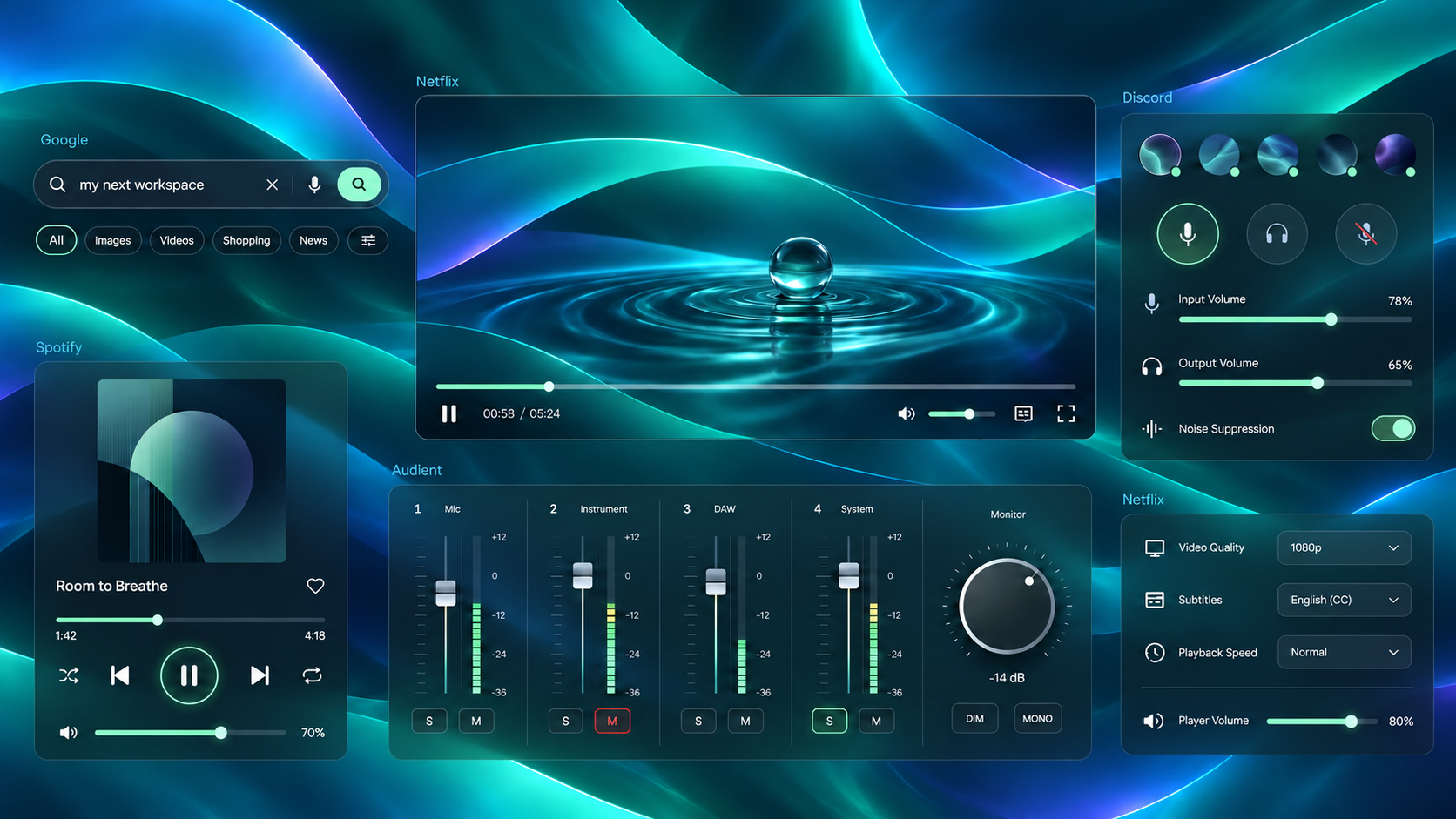
Only The Pieces You Need.

Envisioned tidy desktop with detached Discord voice settings, Audient faders, Spotify playback, original abstract video imagery in a Netflix-labelled panel, and a Google search fragment.
Envisioned five-app workspace: settings, video and graphics arranged without full application windows.

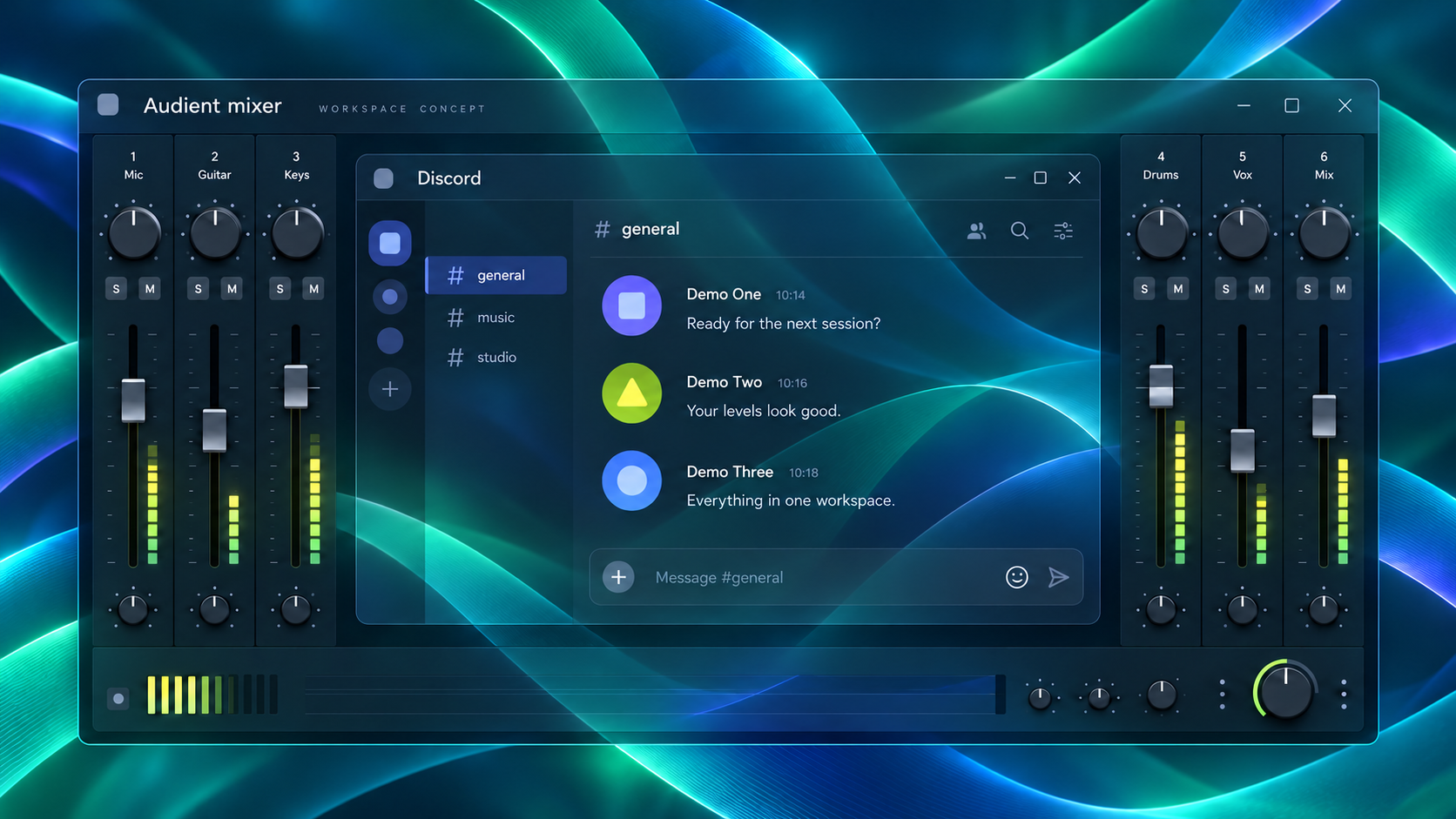
Programs Inside Programs.

Concept illustration of a Discord chat panel nested inside an Audient-style audio mixer, with mixer faders still visible around the chat.
Concept illustration of the planned experience.

We’re aiming for a desktop that fits the way you actually work. An app usually arrives as one big rectangle, even when you only need a small part of it. DudeGlass explores a different arrangement: useful controls close together, less background in the way, and more room for the work that matters. Your tools stay familiar, while the space around them becomes something you can make your own.

Imagine a Discord conversation inside your Audient mixer workspace. Your chat stays close, your audio levels stay in view, and switching between them feels natural. That’s the idea: familiar apps sharing a carefully arranged space, with the controls you reach for most kept nearby. Less hunting around the desktop, more attention on the conversation, the mix, or the next good idea.

We want to build on cropping and transparency so you can choose which parts of an application deserve screen space. A level control, a reference image, a conversation or a small set of settings could become part of your own arrangement. The goal is to keep those pieces readable and useful while making more of the desktop visible. You choose the pieces, their position, and the layout that feels right.

Getting there means taking interaction seriously. A convincing picture is only the beginning: clicking, scrolling, typing, focus and recovery all need to behave reliably. We’re working towards layouts you can change and restore confidently, with clear information about the app and adapter versions that work together. A tidy workspace should feel easy to use, with dependable controls behind the good looks.

This is the road ahead, and your feedback helps shape it. Real demonstrations, application testing and the problems people report will guide what is ready and what needs more work. We want a workspace that feels personal, practical and a little surprising, built around the pieces you actually use. Tell us what gets in your way, what saves you time, and which small improvement would make a big difference.

Accessibility belongs in this future too. We want everyday controls to be easier to reach, layouts easier to understand, and interaction more predictable across different ways of using a computer. As support grows, the aim is to offer useful choices about where your tools live and how you reach them. More comfort, less unnecessary effort, and a workspace that fits the person sitting in front of it.

MORE PLACES TO MAKE YOURSELF AT HOME

Windows First. Wider Horizons.

We’re hoping to take the DudeGlass idea beyond Windows and explore more of the Apple, Linux and mobile worlds. Different systems need different approaches, and we want to find out where this kind of workspace freedom can go next.

  • Linux
  • SteamOS
  • macOS
  • iPadOS
  • iOS
  • Android
  • ChromeOS
  • Windows On ARM

More Playgrounds For The Ideas.

Windows virtual machines have already been tested. Next, we’d like to explore more VM configurations, remote desktops, browser-based workspaces and sandboxed test environments. These give us more places to experiment with layouts, accessibility and useful ways to bring controls together.

Research goals, not current platform support or confirmed releases.

Future direction.

FROM REAL DESKTOPS

Let The Users
Have The Last Word.

Beta Stories, Coming Soon.

Real feedback belongs here. We’ll add testimonials from beta users as they’re shared with permission.

KEEP THE BETA. FOR LIFE.

Big Ideas. Small Price.
F*ck Subscriptions.
Own The Software You Buy.

One purchase gives you lifetime access to the beta version of DudeGlass, including Companion.

DudeGlass peace-hand logoDudeGlassBy Dude Industries
Originally planned US$29.99
$3.99 USD

US$26.00 less · 86.7% lower

One-time payment · plus applicable taxes

  • Lifetime beta license
  • DudeGlass + Companion for Windows
  • Full license key on the website and by email

Checkout is being set up. No payments are being accepted yet.

Applicable taxes will be calculated from your billing location and shown before payment.

WHY COMPANION IS INCLUDED

A Better Desktop
Should Be Within Reach.

I originally planned to price the Companion version at US$29.99. I decided against that, because I want people to have access to it regardless of their financial background.

The tools that make your computer more comfortable and useful shouldn’t be reserved for people with the biggest budgets. I want accessibility and usability to be at the heart of DudeGlass, including the decision about what belongs in the build.

That’s why Companion is included with DudeGlass’s planned US$3.99 one-time lifetime beta license, plus applicable taxes. There is no separate Companion purchase. At US$3.99 for the combined beta, that is 86.7% lower than my originally planned US$29.99 price. If you’d like to support continued development beyond that, contributions are entirely optional.

US$26.00 less · 86.7% lowerUS$3.99 for DudeGlass + Companion, compared with the originally planned US$29.99 Companion price—a US$26.00 reduction. Base prices before applicable taxes; not a claim of a previous selling price.
— Brendan Twamley

FROM PURCHASE TO DESKTOP

Your Key. Yours To Keep.

The purchase process we’re preparing for launch.

  1. 1

    Pay Securely With Stripe

    Review the US$3.99 price, applicable taxes and final total before paying.

  2. 2

    See Your Full License Key

    After payment is confirmed, return to the website to view and copy your key.

  3. 3

    Keep Your Confirmation Email

    It will include your payment confirmation, full key and a personal link to your license page.

A Few Useful Details.

The practical stuff, without the treasure hunt. Search a question or open one below.

FAQ Questions

29 answers

What Is DudeGlass?

DudeGlass + Companion combines desktop reveal groups, window-opacity controls, cropped views and version-specific glass treatments in one Windows beta. The idea is to keep useful controls close and give the rest of your desktop some breathing room.

Which Programs Have Glass Support Today?

Selective glass support currently covers qualified versions of Discord and Audient iD Mixer. The application version and matching adapter version matter. Check the compatibility information for your build before relying on an integration.

Does It Work With Every Application?

Not yet. Different features have different requirements. Desktop shortcut groups are separate from application-specific glass adapters, and cropped views depend on the source app. Broader support is a development goal.

Will There Be Versions For Mac, Linux Or Mobile?

We hope to explore Linux, SteamOS, macOS, iPadOS, iOS, Android, ChromeOS and Windows on ARM, along with additional VM configurations and remote workspaces. These are research goals, not current support or confirmed releases. Features and technical feasibility vary by platform.

Does It Run In A Windows Virtual Machine?

The creator has tested installation and operation in a Windows virtual machine. That is a tested Windows environment alongside the desktop setup. Exact app, adapter and virtual-graphics compatibility still depends on the VM configuration; it is not a claim that every hypervisor or guest setup has been tested.

Is Transparency The Same As Selective Glass?

Whole-window opacity fades the entire window, including its text and controls. Selective glass treats supported background regions differently so useful foreground content can remain clearer. Selective support depends on compatible apps and adapters.

Are The Career Examples Available Features?

The blueprint, schematic, Fresco-style and five-app workspaces are future workflow concepts. They show where we want to go, rather than announcing current AutoCAD, Adobe, Google, Spotify or Netflix integration.

Is The Promo Real Footage?

The Audient controls and desktop-menu sequences come from the creator’s recordings. The recorded sequences retain their original star background, with colour grading, crops and zooms. Its career scenes are concepts, and its soundtrack is original.

Does DudeGlass Rewrite Another Program’s Installed Code?

Our capture and presentation logic is our own. Your original installation is kept separate. Some integrations operate inside a running app, and the current Discord developer setup uses an isolated, adapted copy. Setup and compatibility depend on the build.

Does It Add New Abilities To The Original App?

The aim is to rearrange and present existing UI and controls while keeping the source application’s job intact. DudeGlass cursor effects belong to DudeGlass controls. The future concepts do not promise that every app can be separated or controlled this way.

Can I Use It With Anti-cheat Protected Games?

There is no blanket compatibility guarantee. DudeGlass does not offer anti-cheat modification or bypass. Follow the game’s rules and the build’s compatibility guidance; a gaming workflow concept is not a claim that its adapter is approved for a protected game.

What Is The Difference Between Crop Copy And Crop And Hide?

A crop copy keeps the original visible while showing a cropped view elsewhere. The video in Coming Soon illustrates the future crop-and-hide workflow, where the original view is hidden and the cropped video can move. Those are distinct behaviours.

Can I Keep A Reveal Group Open?

Click the reveal button to pin the group open and highlight its label. Click again to close it. Hover previews close after the pointer leaves the program zone and the configured delay passes.

Can I Scroll Between The Icons?

Yes. The invisible program zone is designed to accept wheel scrolling across the icon area and its gaps without selecting an icon first. Empty space can still pass desktop clicks through.

Can I Sort The Icons?

Right-click the reveal button and choose the sort options. The build includes alphabetical, reverse alphabetical, natural alphanumeric and type-based sorting.

Can I Bring The Original Desktop Icons Back?

Use Restore Original Desktop Items from the reveal menu. Hide Original Desktop Items lets you hide them again. Reset and restore actions are deliberate choices; closing the tray UI should not restore everything unexpectedly.

Does Companion Stay In The Tray?

Yes. Companion runs in the Windows notification area. Desktop reveal controls have an independent background service so they can stay available when the Companion UI closes. Startup must be installed successfully.

How Much CPU And Memory Does It Use?

On the creator’s PC, a 15-second desktop-session sample of the three core processes averaged 0.47% of total CPU and used 113.6 MiB of combined working-set memory. Adapter-host, injected-adapter and GPU costs were outside that sample. Active workloads and other PCs can differ. See the performance section for the scope.

Do I Need The Same PC As The Creator?

No claim is being made that Mustang Sally is the minimum requirement. It is the creator’s development rig. The supported Windows versions, graphics requirements and adapter requirements will be listed with the public release.

Is This A Subscription?

No. The planned US$3.99 purchase is a one-time payment for lifetime use of the beta version, including Companion. It does not promise every future product or paid edition.

How Much Will I Pay With Tax?

The base price is US$3.99. Applicable taxes will be calculated from the billing location and shown before payment when checkout opens. Currency conversion or card fees depend on the payment method.

How Will I Get My License Key?

The launch purchase flow is being prepared to show the full key on the website after confirmed payment and email the payment confirmation, full key and a personal license-page link. This flow must be connected and tested before sales open.

Can I Download Or Buy It Today?

The public release is being prepared. Downloads and checkout will open once activation and license-email delivery are connected and tested. The website is not currently accepting purchases.

What Is The Refund Policy?

Voluntary refund requests must be submitted within 24 hours of purchase and are manually reviewed. Include your purchase email, order number and a short reason. This does not limit consumer rights required by applicable law. The request channel will be available when sales open.

Can I Attach A Screenshot To Feedback?

The Windows build includes optional screenshot attachment, preview and removal controls in License & Feedback. Its public service is being prepared. The website form currently accepts text; review screenshots for personal information before sharing them.

Can I Send A Screen Recording Of A Problem?

Yes. Record the issue, upload the video to YouTube with visibility set to Unlisted, then paste the link into your feedback message with the steps to reproduce the problem. Anyone with the link can view it, so keep passwords, license keys and personal details out of the recording.

What Personal Details Are Encrypted?

Messages and optional reply-email addresses submitted through the website are encrypted in its feedback store. That does not mean DudeGlass encrypts every file or all information used by other apps. Leave passwords and license keys out of feedback.

Will My Email Address Be Public?

A reply email entered in the website feedback form is not displayed publicly. It is optional and is kept with the encrypted message so a reply is possible. The public site does not publish the creator’s personal email address.

How Can I Help The Project?

Send useful feedback, report compatibility problems or share DudeGlass with someone who might enjoy it. Developers, potential partners and investors can use the contact form. Stripe donations are planned but are not being collected until that setup is ready.

TWO PROGRAMS. A LOT OF WORK UNDER THE GLASS.

Two Programs.
One Hell Of A Start.

Glass support currently covers two programs: Discord and Audient iD Mixer. Each needs a compatible application version and adapter version. An update to either can change what works.

Separating a program’s background UI from its controls is extremely complex. Every application draws, handles input and updates in its own way. The current beta does not offer universal glass or complete UI separation across all Windows programs.

We’re working towards broader support, with the long-term goal of supporting all programs. That is a development goal, not a promise of present compatibility.

#

Discord

Compatible app + adapter versions required

≋

Audient iD Mixer

Compatible app + adapter versions required

Support depends on the tested version combination. Exact public release compatibility details will accompany the downloadable build.

CREATOR-TESTED

Windows Virtual Machines

Installation and operation have also been tested by the creator in a Windows virtual machine. This adds a tested Windows environment alongside the desktop setup. App-specific glass compatibility still depends on the application, adapter and VM configuration.

HELP SHAPE THE NEXT BUILD

TELL US WHAT
YOUR DESKTOP NEEDS.

Found a bug? Had a “wouldn’t it be cool if…” moment? Tell me. The good, the broken, the gloriously weird—I want to hear it.

Please leave out passwords, license keys and other sensitive information. This form accepts text; screenshot attachments are available in the Windows app’s feedback tools when its service is configured.

Loading feedback form…

A LITTLE SUPPORT GOES A LONG WAY

Fuel The Next
“What If?”

DudeGlass started with a music teacher, a stubborn idea, and plenty of things that didn’t work the first time. Every step forward has meant learning something new, finding another problem, and deciding to have another go. I’m building it around a full-time teaching job, with real costs for AI usage, servers, hosting and ongoing testing. Your support gives this one-person project more room to grow and helps keep the next build moving.

If DudeGlass makes your desktop feel a little more like yours, a contribution would mean a great deal. It helps me keep tackling the complicated work behind broader app support and turn more of those “what if?” moments into useful tools. Whether you donate, share thoughtful feedback, or tell a friend about DudeGlass, you’re helping this little idea find its feet. Thank you for being part of it and helping the next good idea become something real.

FOR THE NERDS

The PC Behind
The Project.

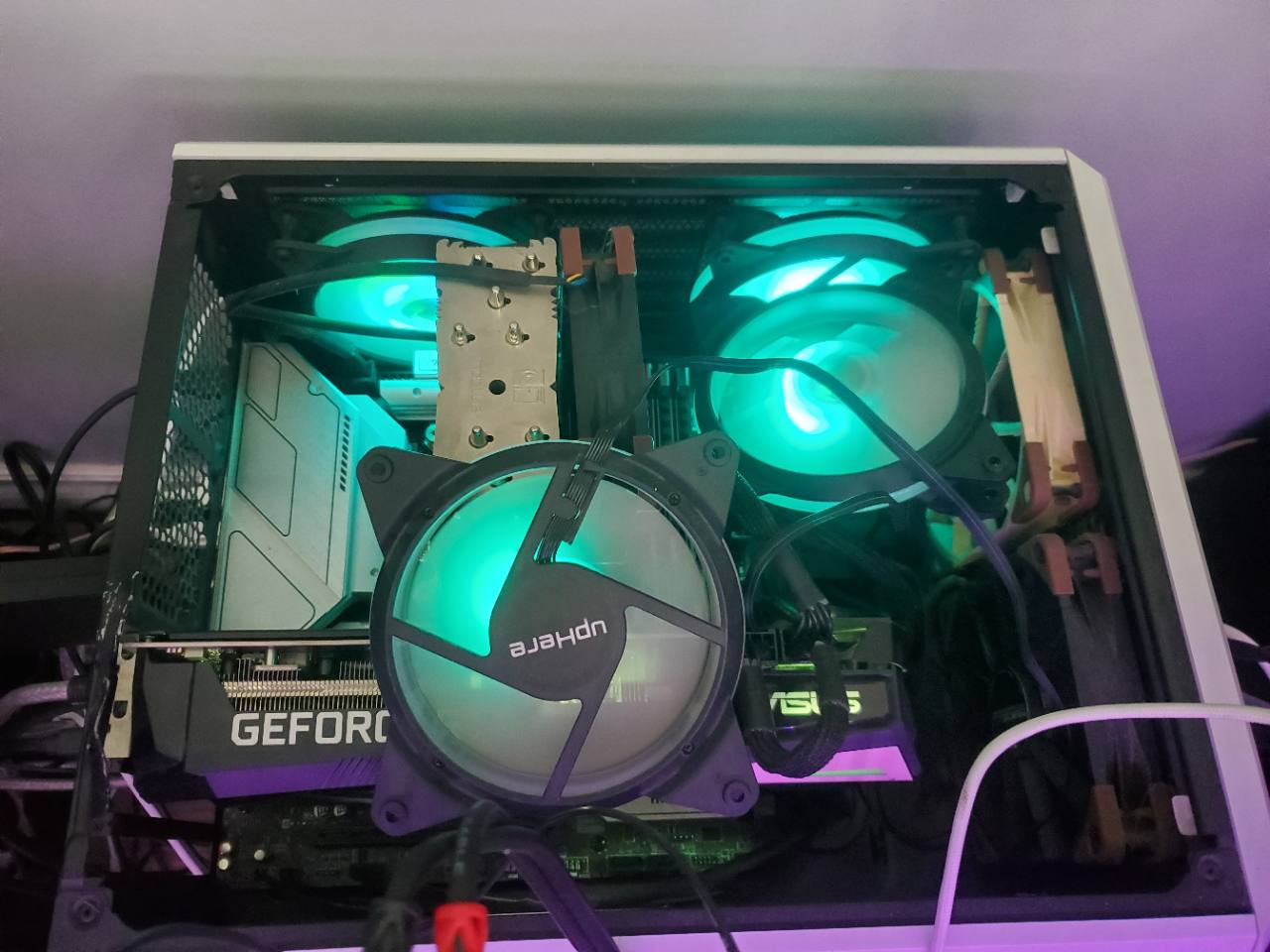
Mustang Sally, the creator’s open-sided PC with teal-lit fans and a GeForce graphics card.
Mustang SallyAKA: the hotrod PC

“This puppy is so fast my side panel popped off.”

The creator’s development rig. These are personal build specs, not the minimum system requirements for DudeGlass.

Motherboard
B660M Mortar WiFi
Memory
32 GB DDR4 · 3600 MHz · CL14
CPU
Intel Core i5-12600K
GPU
NVIDIA GeForce RTX 3070
Displays
Triple-monitor setup · sometimes four monitors

Apollo reached the Moon with onboard computing that looks tiny by today’s standards. Its guidance computer had less raw computing power than many modern programmable calculators. That’s my reminder that the idea matters more than the gear. A good idea, stubborn troubleshooting and a willingness to learn can go a very long way. The Smithsonian on Apollo and programmable calculators ↗

Mustang Sally has an RTX 3070 with 8 GB of VRAM, an older mid-range i5-12600K and 32 GB of DDR4 pushed to 3600 MHz CL14 with fairly tight timings. I’ve spent plenty of time squeezing what I can out of the hardware I already own. The hotrod name is earned.

My usual tuning philosophy is pretty much b*lls to the wall. I favour aggressive manual tuning and strong single-core performance over leaving everything at stock power-saving settings. That describes my development rig and preferences; the benchmark section records the conditions and measurements from each actual run.

LET’S TALK

A Good Idea Often Starts
With A Conversation.

Reach out through the private website form. Choose a topic and include your reply email if you’d like a response. Messages are saved for review without publishing the creator’s email address.

Contact me ↗

INVESTORS & BUSINESS PARTNERS

Interested In Where This Could Go?

I’d love to hear from people who see potential in a more flexible, accessible desktop. If you’re interested in supporting development, exploring a business partnership, or helping DudeGlass reach more people, let’s talk about what we could build together.

Start a conversation ↗

DEVELOPERS & CONTRIBUTORS

Bring Your Expertise.

I’m looking for a few developers willing to volunteer their expertise to help optimize DudeGlass and expand its compatibility. Windows rendering, GPU work, application adapters, input handling, accessibility and testing are all areas where thoughtful help could make a difference.

Contributions are voluntary at this stage. If the project generates enough revenue, I would love to hire a team full-time. For now, tell me about your background and where you’d like to help.

Offer your expertise ↗

THE PEOPLE BEHIND THE PURPOSE

FOR SEAN. FOR MY DAD.
FOR EVERYONE WHO BELIEVED.

DudeGlass carries more than an idea. It carries the people who helped me learn how to think, create and keep going.

IN MEMORY OF MY BEST FRIEND

Sean Schocat

I dedicate this program to my best friend, Sean Schocat, who tragically passed away. A computer engineer, Sean was one of the smartest people I knew—and one of the funniest.

The last conversation I remember having with him was in my Mustang, driving back from a buddy’s wedding. We were talking about the GPU tunnelling pipeline and ways to improve it. It was one of the best conversations I ever had with him: two friends following an idea and seeing where it could go.

That memory means a great deal to me. I’m proud to carry it into this project.

FOR MY HERO AND INSPIRATION

Brian Twamley

I also dedicate DudeGlass to my dad, Brian Twamley, who is currently battling MDS. He is an instrument mechanic and, by far, the smartest person I’ve ever met.

I’ve spent my life working on cars with him: learning how things work, how to troubleshoot, how to fix what’s broken, and how to get creative when the obvious solution doesn’t work. He taught me so much about life and problem solving, often with our hands busy and a car between us.

So much of the way I approach a difficult problem comes from him. He is my hero, and this project has his influence all through it.

To my friends and family: I could never have brought this project this far without you. I am forever grateful for your continued love, patience and support.

A NOTE FROM THE CREATOR

Music Teacher
Developer
The Dude Himself(Jeff Bridges Will Also Always Be The Dude)

Brendan Twamley · Creator of DudeGlass

I’m a high-school music teacher by trade, an advanced PC user, and the person driving DudeGlass’s ideas and architecture. I have zero coding knowledge. I use AI to help turn the design into working software, while I make the product decisions, test what actually happens, troubleshoot the problems and keep pushing the build towards the experience I have in mind. My everyday setup runs three monitors, and sometimes four. I know how I want my computer to work, and this project grew from refusing to settle for the parts that get in the way.

Every new idea seemed to break five other things. I’d fix those, try again, change one thing, and break three more. Then I’d go back, find out why, and keep working. It has been a long lesson in patience, curiosity and refusing to let a difficult problem have the last word.

I’ve driven the vision, the workspace design, the testing and the stubborn little details that turn an experiment into something useful. I pushed for live controls that stay readable, invisible zones that still scroll, reveal buttons that remember their job, and a Companion that quietly gets on with it in the tray. I kept bringing the pieces back together, testing them on my own desktop, and asking what would make the experience feel easier for the person using it.

The hurdles have been properly ridiculous at times: rendering differences between apps, version-specific adapters, cursor behaviour, lost focus, clicks landing in the wrong place, and a fix in one corner causing chaos in another. Keeping something transparent while making its controls dependable takes a lot of testing and a willingness to start again. Apparently, my after-school hobby became asking Windows, “Why the hell would you do that?” Then working out a better answer.

The innovation I’m chasing is a workspace built from the useful parts of your programs, with their placement and interaction designed around you. To the best of my knowledge, some of the ways I’m bringing that idea together are breaking new ground. That’s my perspective as the creator, and I want to back it up with working demonstrations. We have qualified glass support for two programs so far, and I’m proud of the persistence and problem solving it took to get here.

Despite all of that—or maybe because of it—I’m excited about what DudeGlass could become. I want to make software that feels natural to use: a stylish Windows workspace that remembers your choices and gives you useful controls without turning every small adjustment into another job.

Make It Your Workspace.

  • Adjust window opacity and explore glass treatments in supported apps.
  • Use colour-wheel controls for supported workspace backdrops and glass tints.
  • Create a crop copy, or crop and hide the original window.
  • Group desktop shortcuts behind text-only reveal buttons.
  • Scroll across the invisible group zone and choose your preferred sort order.
  • Save workspace arrangements, back up settings and restore saved app positions.
  • Keep Companion in the tray while desktop reveal controls run independently.
  • Send feedback with an optional screenshot you can preview before sharing.

These features have different support requirements. Compatibility is being tested application by application as the beta develops.

I’ve lived through Windows 95, 98, 2000, XP, Vista, 7, 10 and 11. Across those versions, I’ve noticed one common thing: they all suck.

That’s my very diplomatic review. Simple settings can turn into a hunt through menus. One useful control comes wrapped in an entire window. References disappear behind whatever you’re working on, your desktop becomes a game of hide-and-seek, and getting everything into a comfortable layout can feel like a job of its own. Too often, I end up arranging my work around the interface when I want the interface to fit my work. I want more freedom over what stays visible, what moves, and what gets out of the way. It’s my PC. Let me use the damn thing my way.

I’m also tired of watching people disappear down the YouTube “PC optimization” rabbit hole, make a pile of changes, and come back with negligible gains—if they notice any gain at all. I’ve seen the frustration when those tweaks break useful features or leave someone troubleshooting a computer that was working before. My goal is to make improvements you can actually feel in everyday use: a clearer workspace, useful controls within reach, and choices you understand. Your PC should work for you. Getting there shouldn’t require sacrificing the features you still rely on.

THE IDEA I KEEP COMING BACK TO

Programs Inside Programs.
Your Placement. Your Choice.

My ambition is a minimally invasive separation of an application’s background UI from its useful controls. I want to go beyond a transparency skin: keep the pieces you need, remove unused visual regions and their input-blocking areas where support allows, and arrange controls from different applications around the way you work.

The design goal is to change presentation while preserving what the original application does, without rewriting its installed files or modifying anti-cheat systems. Complete UI separation and cross-application arrangements remain development goals, with rendering and input behaviour to be qualified for each supported application.

I believe in the right to repair. I believe in user experience, accessibility and usability. I don’t support subscription models for the ownership experience I’m trying to offer here: DudeGlass’s planned beta license is a one-time purchase for lifetime beta use. Those values should guide this product and the ideas that follow it.

I’m still a full-time music teacher, so there are limits to the hours I can put into this. AI usage, servers and hosting also cost money. I can’t do all of it alone, and every person who supports the project or takes the time to share useful feedback helps me keep moving.

Please tell us what you like, what gets in your way, and what you’d like DudeGlass to do next. The website feedback form is open now. In-app feedback, including an optional screenshot, will also be available when its public service is configured. I’d love to hear from you.

Thank you for being part of this.
-The Dude